If you have spent any time researching WordPress website builders, you have almost certainly come across the name Divi. It comes up in tutorials, YouTube videos, Facebook groups, and practically every “best WordPress theme” list published in the last five years.
But what exactly is Divi? Is it a theme? A page builder? A plugin? And more importantly, is it the right tool for your website?
This guide answers all of those questions in plain language, without the technical jargon.
What Is Divi?
Divi is a WordPress theme and visual page builder developed by Elegant Themes, a company founded by Nick Roach in 2008. Since its launch, Divi has grown into one of the most widely used website building tools in the WordPress ecosystem, with over 800,000 active customers worldwide.
At its core, Divi gives you two things: a professionally designed WordPress theme and a drag-and-drop page builder that lets you design any page on your website without writing a single line of code.
The reason so many people get confused about Divi is that the name actually refers to multiple things at once. “Divi” can mean the Divi Theme, the Divi Builder plugin, or the entire Elegant Themes product suite depending on the context. We will break each of these down clearly.
Divi Theme vs Divi Builder: What Is the Difference?
This is where most beginners get confused, so let us address it directly.
The Divi Theme is a complete WordPress theme. It controls the overall look of your website including the header, footer, blog layout, and typography. When you install Divi as your WordPress theme, your entire site takes on the Divi framework.
The Divi Builder is the visual drag-and-drop editor that comes built into the Divi theme. It is the tool you actually use to design your pages. You add sections, rows, and modules to build any layout you can imagine, all by clicking and dragging elements on screen.
Here is the important part: the Divi Builder is also available as a standalone plugin. This means you can use the Divi Builder on any WordPress theme, not just the Divi theme. However, most people use the Divi theme and Divi Builder together as a complete package.
How Does the Divi Builder Work?
The Divi Builder operates on a three-level structure: Sections, Rows, and Modules.
Sections are the largest building blocks. Think of them as horizontal slices of your page. A typical page might have a hero section at the top, a features section in the middle, and a contact section at the bottom.
Rows sit inside sections. Each row can be divided into multiple columns. You can have a full-width single column row, a two-column row, a three-column row, and many other combinations.
Modules are the actual content elements that go inside rows. This is where text, images, buttons, videos, and all other content lives.
When you open the Divi Builder on any page, you see a live visual preview of your page. Every change you make appears instantly on screen. You do not need to switch between an editor and a preview mode the way you would in older WordPress tools.
What Are Divi Modules?
Modules are the individual content blocks available inside the Divi Builder. Each module is designed for a specific type of content. As of 2025, Divi includes over 46 modules.
Here are some of the most commonly used ones:
- Text Module — For adding and formatting body text, headings, and paragraphs.
- Image Module — For inserting images with optional captions, links, and animation effects.
- Button Module — For adding call-to-action buttons with full control over color, size, border, and hover effects.
- Video Module — For embedding YouTube, Vimeo, or self-hosted videos directly on your page.
- Blurb Module — A combination of an icon or image with a heading and text. Widely used for feature lists and service descriptions.
- Slider Module — For creating image or content sliders with multiple slides.
- Gallery Module — For displaying a collection of images in a grid or slider format.
- Contact Form Module — For building contact forms directly inside the page builder without a separate plugin.
- Blog Module — For displaying your recent blog posts in a grid or list format anywhere on your site.
- Testimonial Module — For showcasing customer reviews and feedback.
- Pricing Table Module — For displaying service packages or pricing plans in a clean, structured format.
- Tab Module — For organizing content into clickable tabs to save page space.
- Accordion Module — For creating collapsible FAQ sections or content panels.
- Count Up Module — For displaying animated statistics like “10,000+ customers served.”
- Social Media Follow Module — For adding social media icons that link to your profiles.
These modules cover the needs of most websites without requiring any additional plugins. Each module comes with extensive design settings including colors, fonts, spacing, borders, animations, and responsive controls for mobile and tablet views.
What Is Divi 5?
In 2024, Elegant Themes released Divi 5, a major rebuild of the entire platform from the ground up. Divi 5 is not just an update. It is a complete rewrite of the codebase with a focus on performance, speed, and a more modern editing experience.
The most significant changes in Divi 5 include:
Faster loading speeds — Divi 5 generates cleaner code than previous versions, which means websites built with it load faster. Independent tests have shown meaningful improvements in Core Web Vitals scores compared to Divi 4.
New visual editing interface — The builder interface has been redesigned to feel more modern and responsive. Panels are more organized and settings are easier to find.
Global styles system — You can now define colors, fonts, and styles globally across your entire website from one place. Change your brand color once and it updates everywhere.
Improved mobile editing — Divi 5 gives you more precise control over how your design looks on mobile devices and tablets.
Divi Quick Sites — A new feature that lets you generate a complete website with AI-designed layouts in minutes. You answer a few questions about your business and Divi builds a starter site for you automatically.
If you are starting a new Divi website today, you should start with Divi 5 rather than the older Divi 4.
What Is Divi AI?
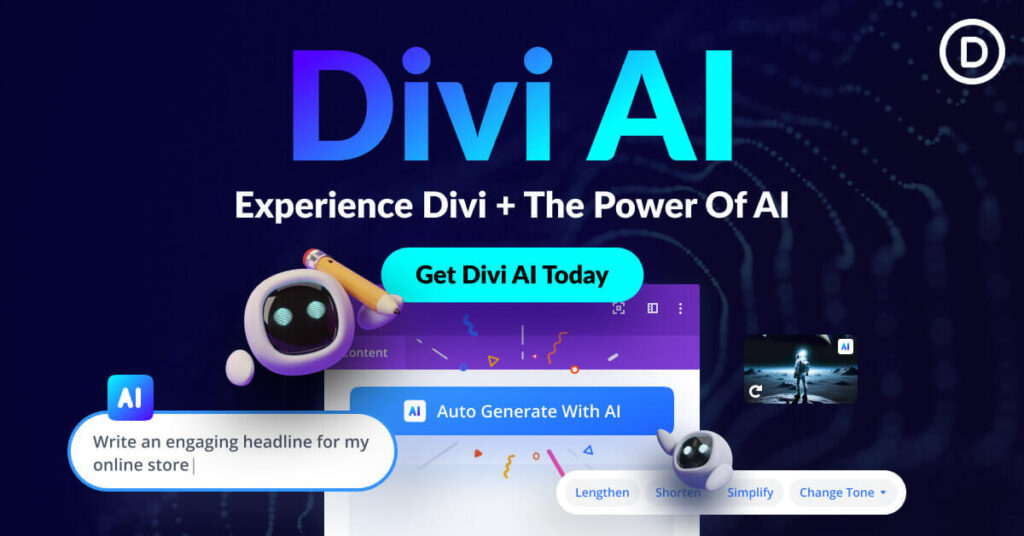
Divi AI is an artificial intelligence assistant built directly into the Divi Builder. It was introduced as an optional add-on and has become one of the most talked-about features in the Divi ecosystem.
With Divi AI, you can generate written content for any module on your page without leaving the builder. You can ask it to write a hero section headline, generate product descriptions, create FAQ answers, or rewrite existing text in a different tone.
Beyond writing, Divi AI can also generate images. You describe what you want and Divi AI creates a custom image that you can insert directly into your page.
For website owners who are not confident writers or designers, Divi AI removes one of the biggest obstacles to building a professional-looking site.
Divi Theme Options and Settings
Beyond the page builder, the Divi theme comes with a comprehensive settings panel called Divi Theme Options. This is where you configure your website at a global level.
From Theme Options, you can set your website logo, configure navigation menus, set default fonts and colors, manage your SEO settings, connect social media accounts, and control performance options like script loading.
The Theme Options panel is separate from the Divi Builder. Think of it as the backend control center for your site, while the Divi Builder is the front-end design tool.
Divi Layouts and Child Themes
One of the most practical advantages of using Divi is the availability of pre-built layouts and child themes.
Divi Layouts are ready-made page designs that you can import into your website with one click. Elegant Themes has released hundreds of free layout packs covering categories like business, restaurant, portfolio, photography, fitness, medical, and many others. Once you import a layout, you customize it with your own content, colors, and images.
Divi Child Themes are complete website designs built on top of the Divi parent theme. They include custom headers, footers, page templates, and design styles that go beyond what the standard Divi theme offers. Child themes are available from Elegant Themes directly as well as from dozens of third-party developers.
For anyone who does not want to design from scratch, layouts and child themes dramatically reduce the time it takes to get a website online.
Who Makes Divi? A Brief Look at Elegant Themes
Divi is made by Elegant Themes, a company that has been building WordPress products since 2008. The company is based in the United States and has a fully remote team.
In addition to Divi, Elegant Themes also makes Extra (a magazine-style WordPress theme), Bloom (an email opt-in plugin), and Monarch (a social media sharing plugin).
Elegant Themes operates on a membership model. When you purchase a Divi membership, you get access to all of their products, not just Divi.
Divi Pricing: What Does It Cost?
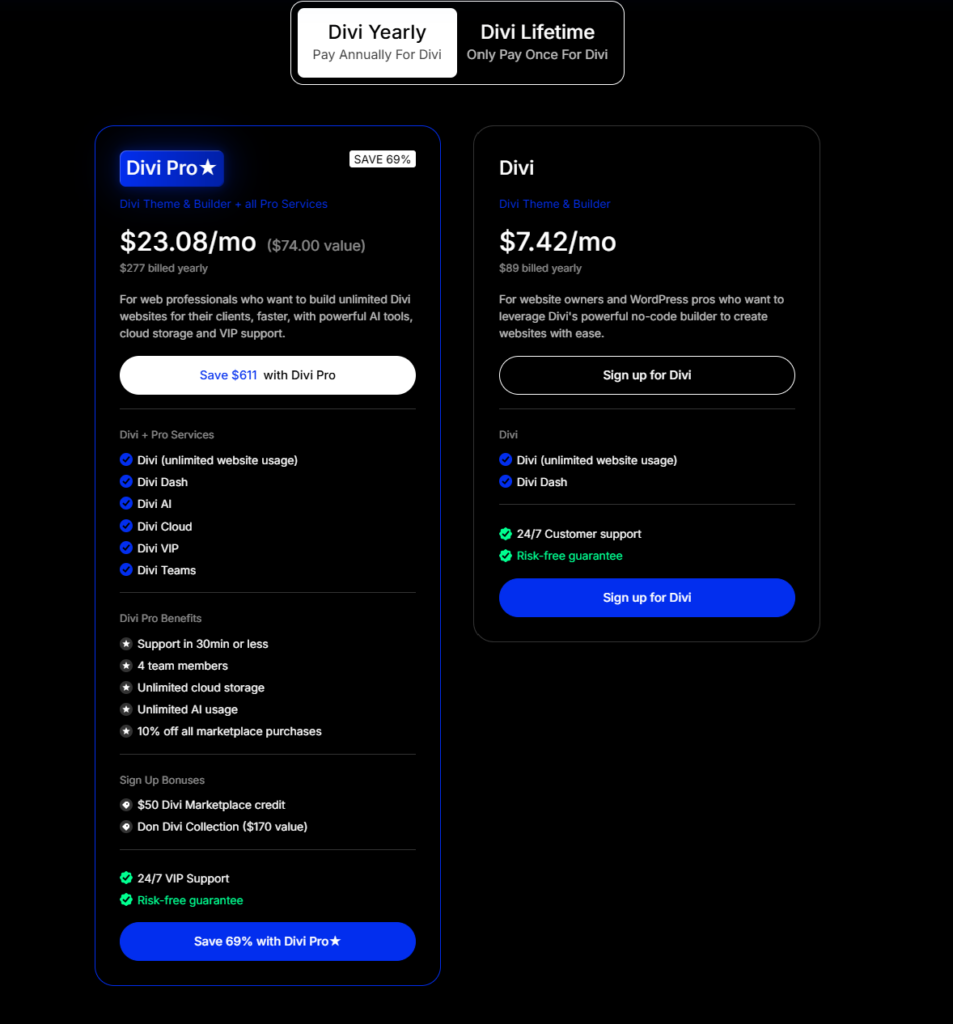
Elegant Themes offers two pricing options for Divi.
Annual Access costs $89 per year. This gives you access to all Elegant Themes products, updates, and premium support for one year. When your year is up, you can renew to continue receiving updates or keep using the version you have without renewing.
Lifetime Access costs $249 as a one-time payment. You get lifetime access to all products and updates with no recurring fees.
For anyone planning to use Divi for the long term, the Lifetime plan pays for itself within three years compared to the annual subscription.
Divi AI is an optional add-on with separate pricing. The basic Divi membership does not include Divi AI by default.
Is Divi Good for SEO?
This question comes up frequently among new Divi users. The short answer is yes, Divi is SEO-friendly when used correctly.
Divi generates clean HTML output, supports schema markup, and is compatible with all major WordPress SEO plugins including Rank Math and Yoast SEO. The Divi theme does not add unnecessary code that would slow down your site or harm your search rankings.
The longer answer is that SEO performance depends more on how you configure your website than on the theme itself. A Divi website with properly optimized content, fast hosting, correctly sized images, and a well-structured internal linking system will perform well in search results.
The most important factors for SEO with Divi are choosing a fast hosting provider, installing an SEO plugin like Rank Math, optimizing your images before uploading, and writing content that genuinely answers what your readers are searching for.
Who Should Use Divi?
Divi is a practical choice for several types of users.
Beginners who have no coding experience will find Divi accessible because the entire design process is visual. You do not need to know HTML, CSS, or PHP to build a professional website.
Freelancers and agencies benefit from Divi because one membership covers unlimited websites. If you build websites for clients, Divi pays for itself after the first or second project.
Small business owners who want to manage their own website without hiring a developer will find Divi’s interface logical and relatively easy to learn.
Bloggers who want more design control than a standard WordPress theme provides will appreciate Divi’s flexibility.
Divi may not be the right choice for large enterprise projects that require custom development, or for developers who prefer working directly in code rather than a visual interface.
Divi vs Other Page Builders
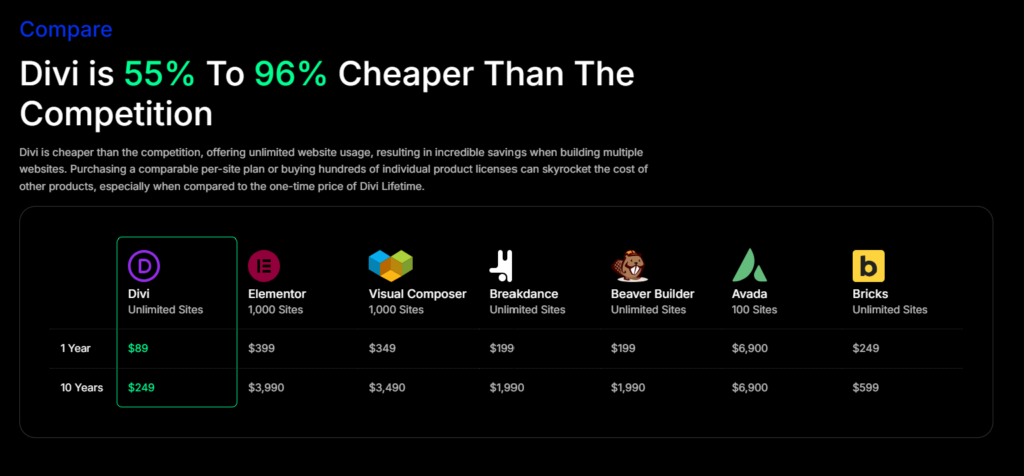
Divi competes primarily with Elementor, Beaver Builder, and WPBakery in the WordPress page builder market.
Compared to Elementor, Divi offers a more comprehensive package because the membership includes multiple products beyond just the builder. Elementor’s free version is quite capable, but its paid plans can be more expensive than Divi for users who need advanced features.
Compared to Beaver Builder, Divi has a larger community, more pre-built layouts, and a more active development pace. Beaver Builder is known for its stability and clean code, which some developers prefer.
The choice between builders ultimately comes down to personal preference. Most experienced WordPress users recommend trying both and deciding based on which workflow feels more natural to you.
Frequently Asked Questions
Is Divi a theme or a plugin?
Divi is both. The Divi Theme is a WordPress theme that you install like any other theme. The Divi Builder is a visual page builder that is built into the theme. The Divi Builder is also available as a standalone plugin that works with other themes.
Do I need coding skills to use Divi?
No. Divi is designed specifically for users without coding experience. The entire design process happens visually through drag-and-drop. That said, users who know CSS can take Divi further with custom styling.
Can I use Divi on multiple websites?
Yes. A single Elegant Themes membership covers unlimited websites. This makes Divi particularly cost-effective for freelancers and agencies.
Is Divi free?
No, Divi requires a paid Elegant Themes membership. There is no permanently free version. However, Elegant Themes occasionally offers free trials and the pricing is competitive compared to other premium page builders.
What is the difference between Divi 4 and Divi 5?
Divi 5 is a complete rebuild of the platform with faster performance, a redesigned interface, improved mobile editing, and new features like Divi Quick Sites. New users should start with Divi 5.
Does Divi work with WooCommerce?
Yes. Divi is fully compatible with WooCommerce, the most popular WordPress e-commerce plugin. You can use Divi to design your shop pages, product pages, cart, and checkout.
Is Divi good for beginners?
Yes, though there is a learning curve involved. Most beginners feel comfortable with the basic features within a few hours. The more advanced features like the Theme Builder and global styles take longer to master.
Final Thoughts
Divi is a mature, well-supported WordPress theme and page builder that has earned its place as one of the most popular tools in the WordPress ecosystem. It gives you significant design freedom without requiring technical skills, and the membership pricing makes it accessible for individual users and professionals alike.
If you are building a new WordPress website and want a reliable, flexible foundation that you can grow with over time, Divi is worth serious consideration.
The best way to decide if Divi is right for you is to look at real websites built with it, read through the documentation, and take advantage of any trial period Elegant Themes offers.